Starting the Service (Sound)
For the sound operator: Companion tablet (page 1) + Wing mixer. Do this at the end of the countdown, every service.
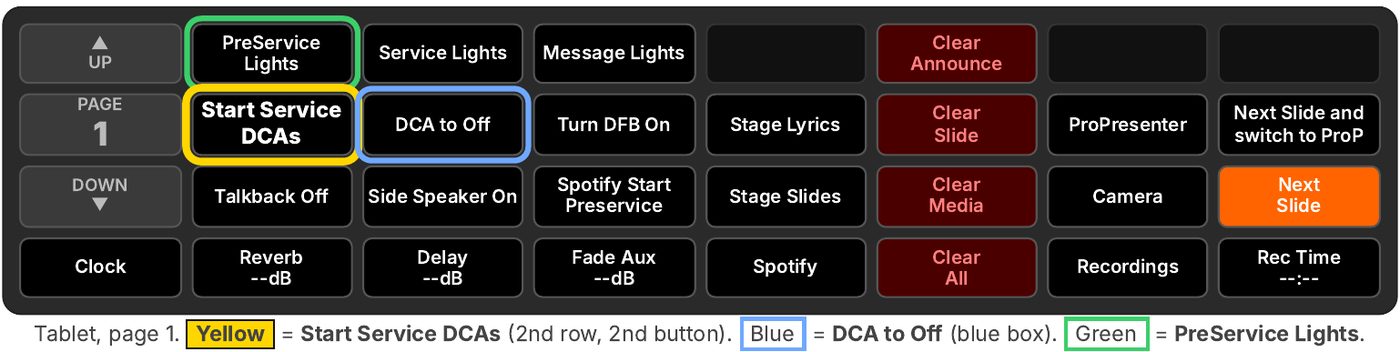
Buttons not showing? Open a web browser on the tablet and go to http://10.20.30.50:8000/tablet
Before service: check that De-Feedback is ON (the "Turn DFB On" button on page 1 toggles it). Not working? Make sure DVS (Dante Virtual Soundcard) is started on the Mac Mini.
1 Press "Start Service DCAs" at ~3 s left
When the countdown video shows about 3 seconds left, tap Start Service DCAs. It runs when you let go (fires on release).
What good looks like: music fades, lights change, camera on screen.
2 The host welcomes everyone
The host talks. The band plays quieter underneath so the host can be heard. Nothing to do yet.
What good looks like: you hear the host clearly over the band.
3 Host finishes: push the Band DCA up to 0
On the Wing, push the Band DCA (DCA 4) up to Unity (0 dB) for the opening song. Then mix as normal.
What good looks like: Band reads 0 dB and the band sounds full.
⚙ What "Start Service DCAs" does for you
- Lights: LightKey goes to the "Service" look (5 s).
- Pre-service music: fades the Aux DCA (DCA 8, Spotify music) out over 6 s, then pauses Spotify.
- Vocals DCA (DCA 3): up to Unity (0 dB) over 5 s.
- Band DCA (DCA 4): up to -15.5 dB only (low under host).
- Drums DCA (DCA 5): up to Unity (0 dB) over 5 s. On purpose: drums usually aren't playing yet, and it saves a fader move later.
- Video: ATEM Key 1 off; camera (input 1) on screen.
- Resets a few other Companion buttons for later.
During the service
Reverb & Delay: between songs or when someone talks on a vocal mic (prayer, announcements, transitions), mute the Reverb and Delay buses (15 and 16). Muting Reverb also takes it out of the singers' in-ears (it's post-fade), so unmute as soon as the next song starts, before the singers come in, and make sure the DCA is up.
After the band leaves: turn down or mute the Drums DCA (DCA 5) so the drum overheads don't pick up the room during the sermon.
Lights: press PreService Lights (green) before and after service, whenever nothing is happening on stage.
Speaker volumes: Wing, Main|MTX page. Lobby = lobby volume. EV Stage Send, EV Side, TS Mains = room balance. Small moves only; note where it sits first.
DCA to Off / On: mute the band in the room, in-ears stay on
- Press "DCA to Off" once: saves the Vocals (DCA 3), Band (DCA 4) and Drums (DCA 5) levels and fades them down (about 4 s).
- Press it again: they fade back up to the saved levels.
What good looks like: the room goes quiet, but the band still hears themselves (in-ear mixes don't follow the DCAs). Use for prayer, the pastor talking while the band plays softly, or a quick mute.
✓ What good looks like
- The pre-service music is gone.
- The lights change to the Service look.
- The camera is on screen (no countdown).
- Vocals (DCA 3) and Drums (DCA 5) at 0, Band (DCA 4) lower at -15.5.
- After the host: Band DCA reads 0 dB (Unity).
⚠ Quick fixes
- Nothing happens? Let go of the button and check the tablet is connected. Buttons missing? Reopen http://10.20.30.50:8000/tablet.
- Band too loud under the host? Pull the Band DCA (DCA 4) down on the Wing.
- Main or lobby volume seems wrong? Check that the Turbosound main and lobby speakers weren't swapped. Auditorium (far house left) speakers use channels 15 (main) / 13 (sub); lobby speakers use 12 / 12. See the Turbosound page.
- Still stuck? Ask the Production Lead.